Curtain Robot EN ZX ADCBBI02
User Manual

English


Model: ADCBBI02
Product Name: Smart Curtain Robot
Supported Platform: Powered by Tuya · Smart Life
The Smart Curtain Robot can be installed on an existing curtain track to upgrade traditional curtains into smart curtains controlled through the Smart Life App. No curtain replacement is required after installation. The product supports opening, stopping, closing, percentage control, scheduled opening/closing, and light-based automation.
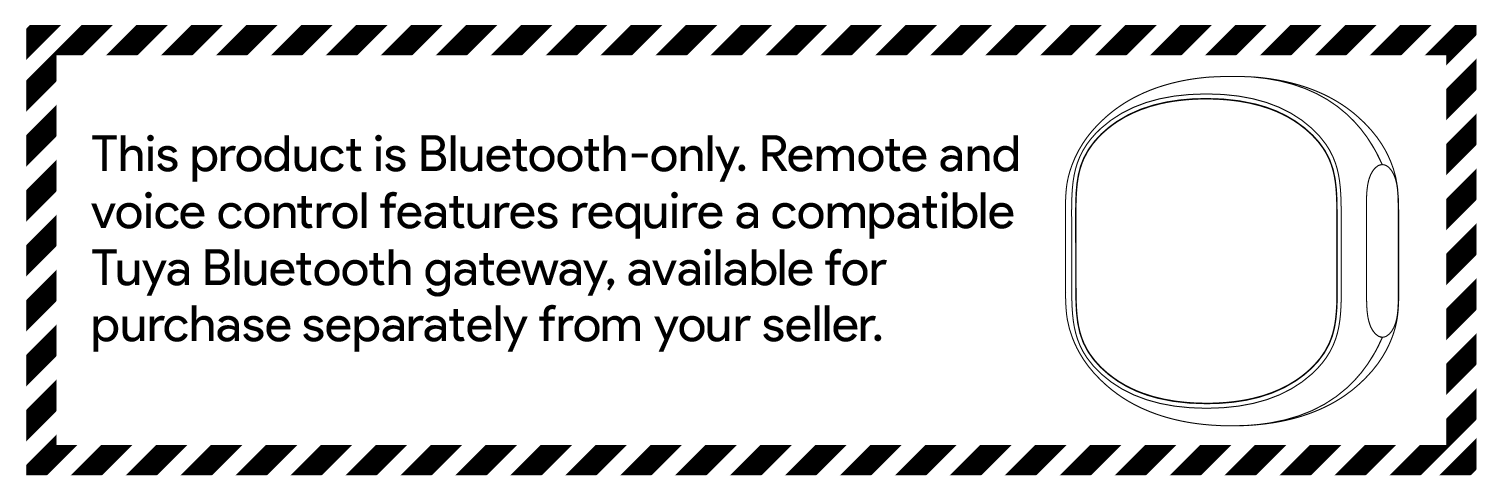
This product uses the BLE 5.0 communication protocol. When the phone is within Bluetooth range, the device can be controlled nearby through the Smart Life App. When paired with a Bluetooth gateway compatible with the Tuya protocol, remote control, automation, and voice control can be enabled. The specific gateway models and availability of third-party voice assistants are subject to channel-confirmed information.
Smart Curtain Robot main unit × 1
Charging cable × 1
Search for “Smart Life” in your mobile app store and install the App. After installation, log in or create an account, then follow the on-screen instructions in the App to add the device.


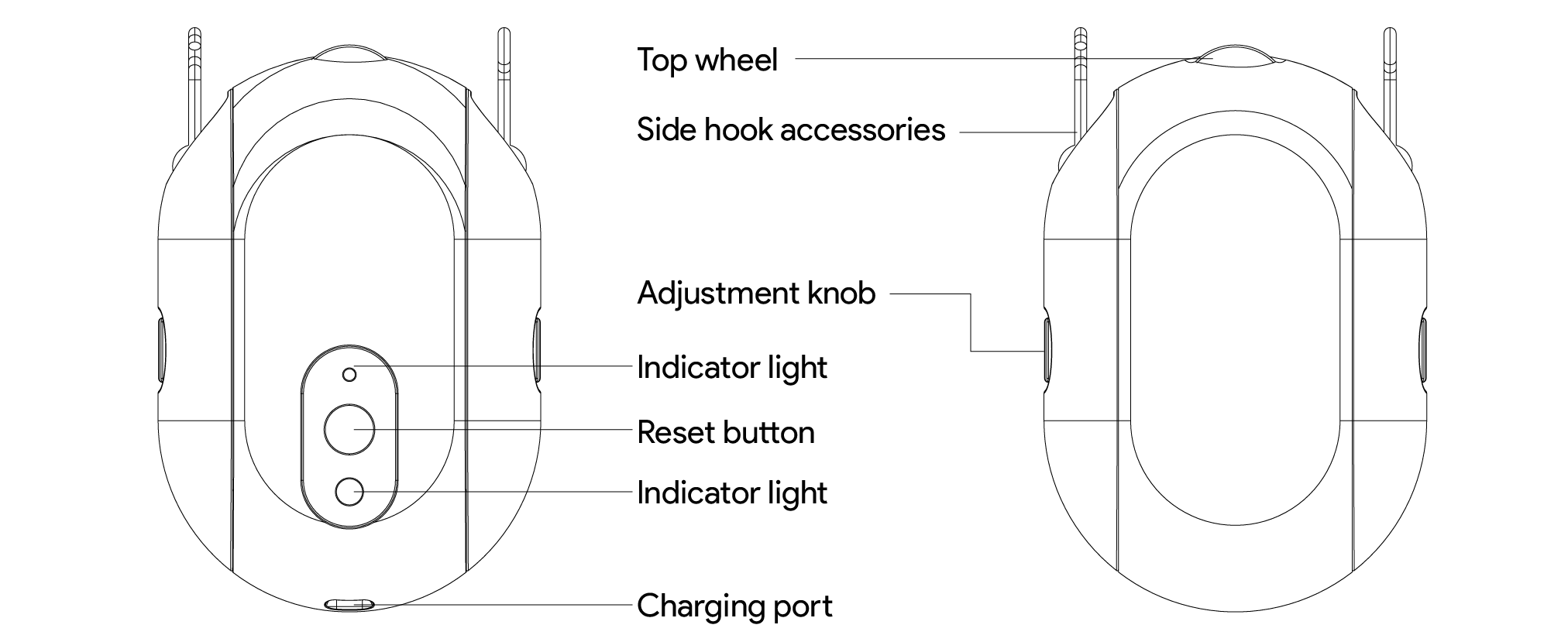
Top wheel: Contacts the curtain track and drives the curtain movement
Side hook accessories: Connect to the curtain hook rings; can slide out from both sides of the main unit during installation
Adjustment knob: Adjusts the hook height so the wheel contacts the track properly
Reset button: Press and hold for 5 seconds to enter pairing mode; the device can be added when the blue light flashes
Indicator light: Shows pairing, charging, and operating status prompts
Charging port: Type-C; a DC 5V/1A power adapter is recommended for charging
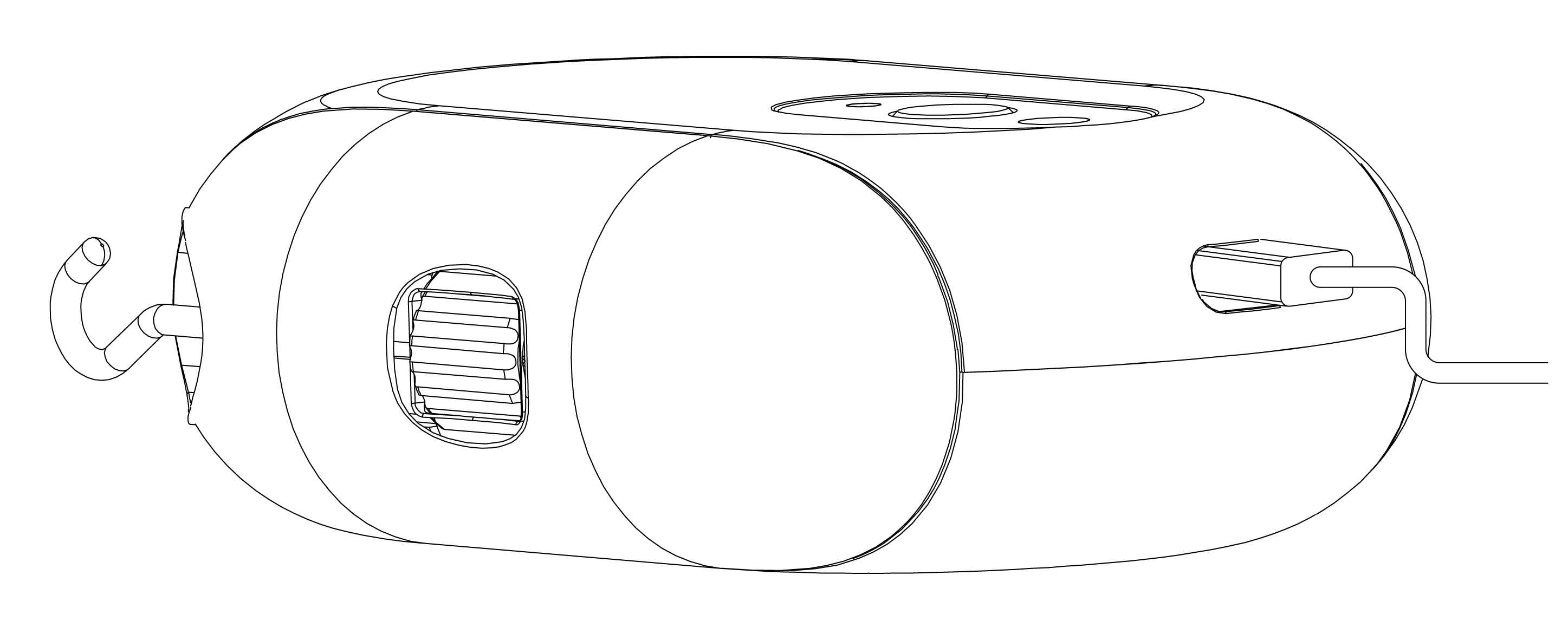
Before first use, it is recommended to charge the device. Use the Type-C charging cable with a DC 5V/1A power adapter to charge the product.
• Charging: blue light breathing;
• Fully charged: blue light steady on;
• Not charging: indicator light off.
1. Open the Smart Life App, tap the “+” button in the upper-right corner of the home page, and select “Add Device”.
2. Press and hold the reset button on the device for 5 seconds until the blue light starts flashing.
3. After the App discovers “Curtain Robot”, tap Add.
4. Follow the on-screen instructions in the App to complete binding.
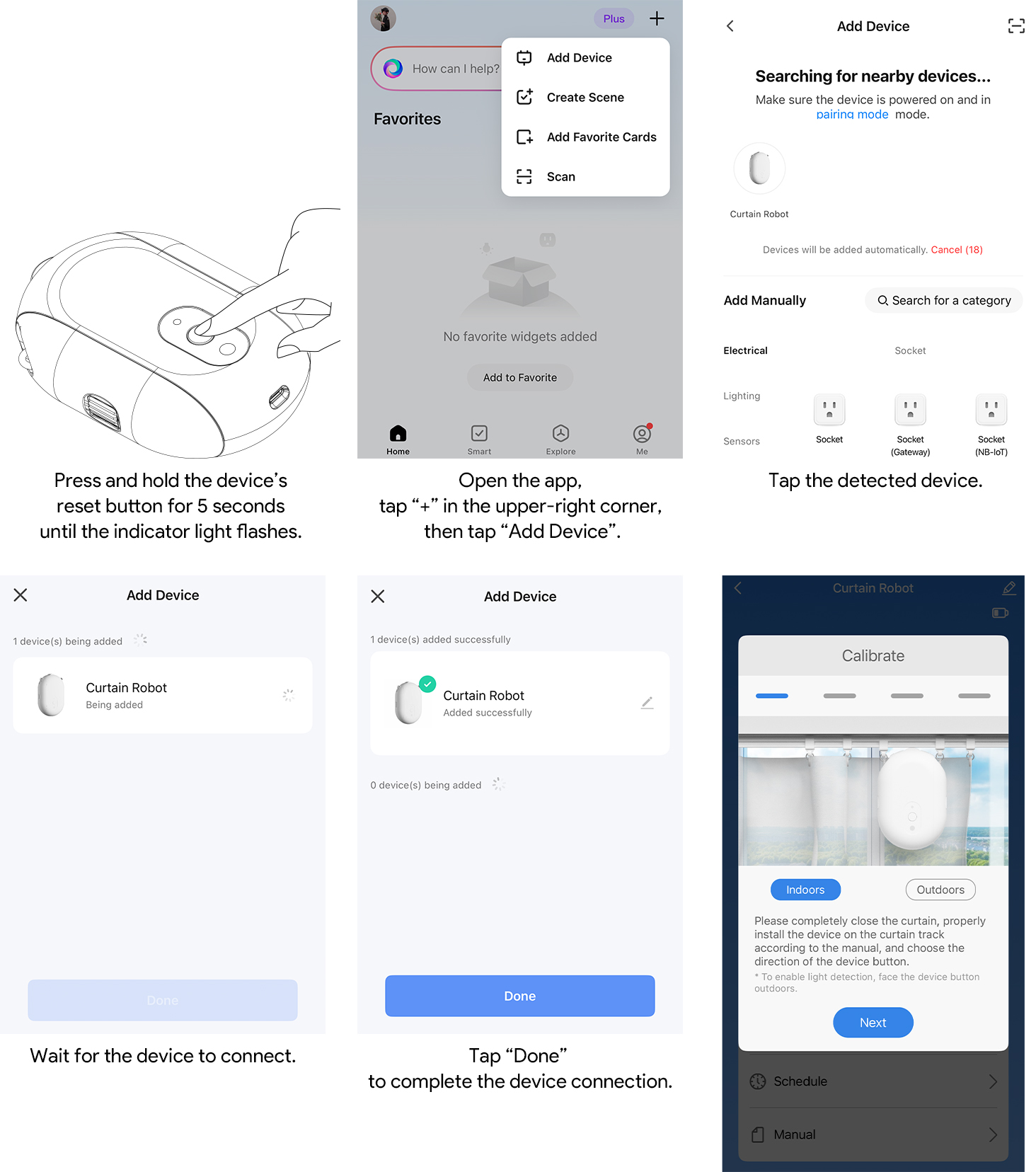
Before installation, make sure the curtain track and curtain hooks are in normal condition, and wipe the area near the installation position clean.
1. At the device installation position, first remove one section of curtain hooks.
2. Leave two empty curtain hook rings in the middle of the removed hook section to reserve installation space for the curtain robot.
3. Slide the side hooks downward relative to the robot body to remove the hook accessories on both sides.
4. Rotate the knob on the side of each hook accessory to adjust the hook to its longest position.
5. Install the two side hooks onto the two empty curtain hook rings reserved in step 2.
6. Combine the curtain robot body with the hooks on both sides.
7. Adjust the knobs on both sides so that the top wheel of the curtain robot fits tightly against the curtain track.
During installation, you can gently tilt the curtain robot to the left and right to make it easier to adjust the tightness of the knobs on both sides.

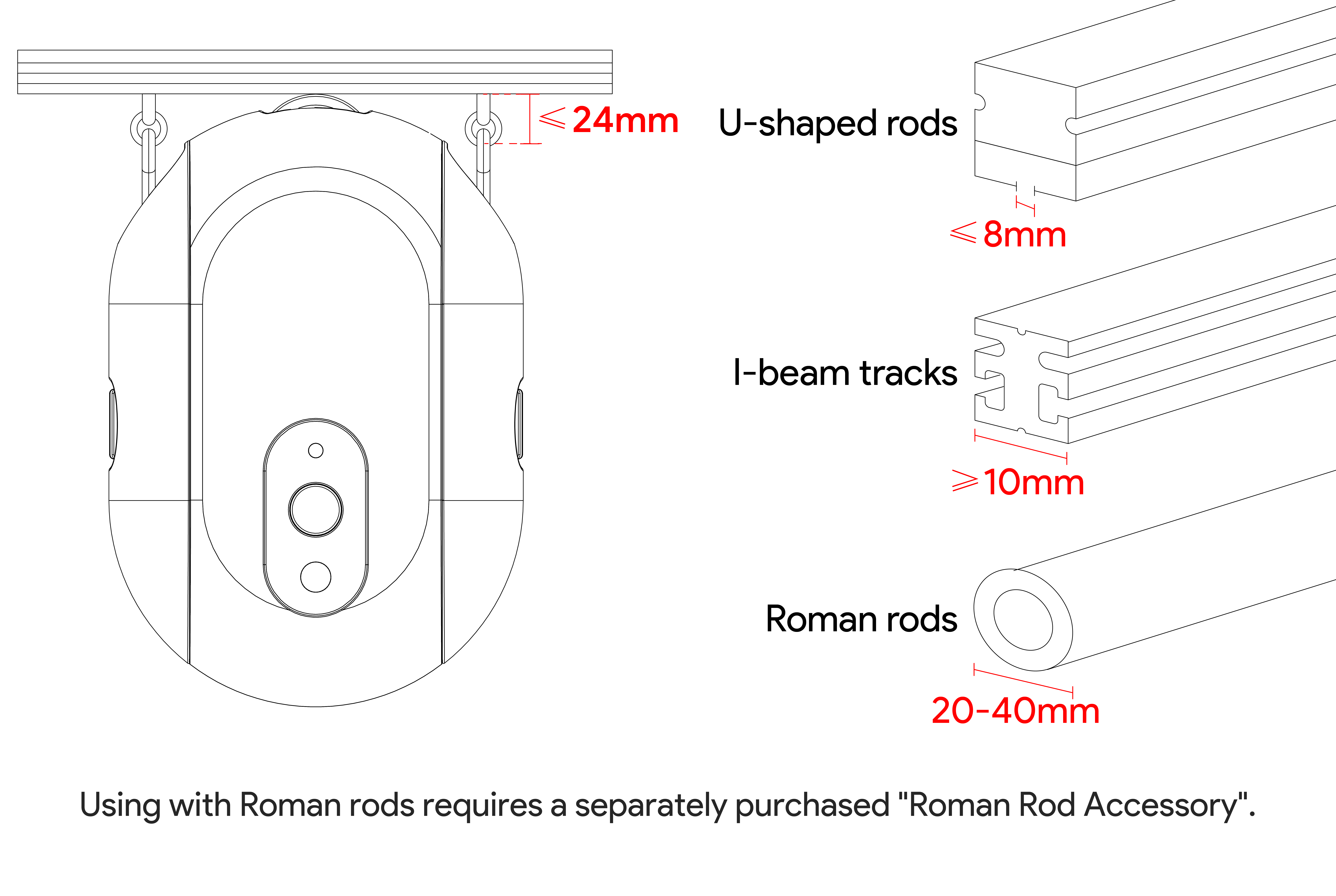
This product is suitable for U-shaped tracks, I-shaped tracks, and Roman rods. Confirm the installation environment according to the following requirements:
U-shaped track: Distance between product hook and track bottom ≤ 24 mm; bottom slot width of track ≤ 12 mm
I-shaped track: Distance between product hook and track bottom ≤ 24 mm; bottom width of track ≥ 10 mm
Roman rod: Distance between product hook and bottom end of rod ≤ 24 mm; tube diameter 20–40 mm
If the distance between the Roman rod ring hook position and the bottom end of the rod exceeds 24 mm, confirm separately whether Roman rod accessories are required.
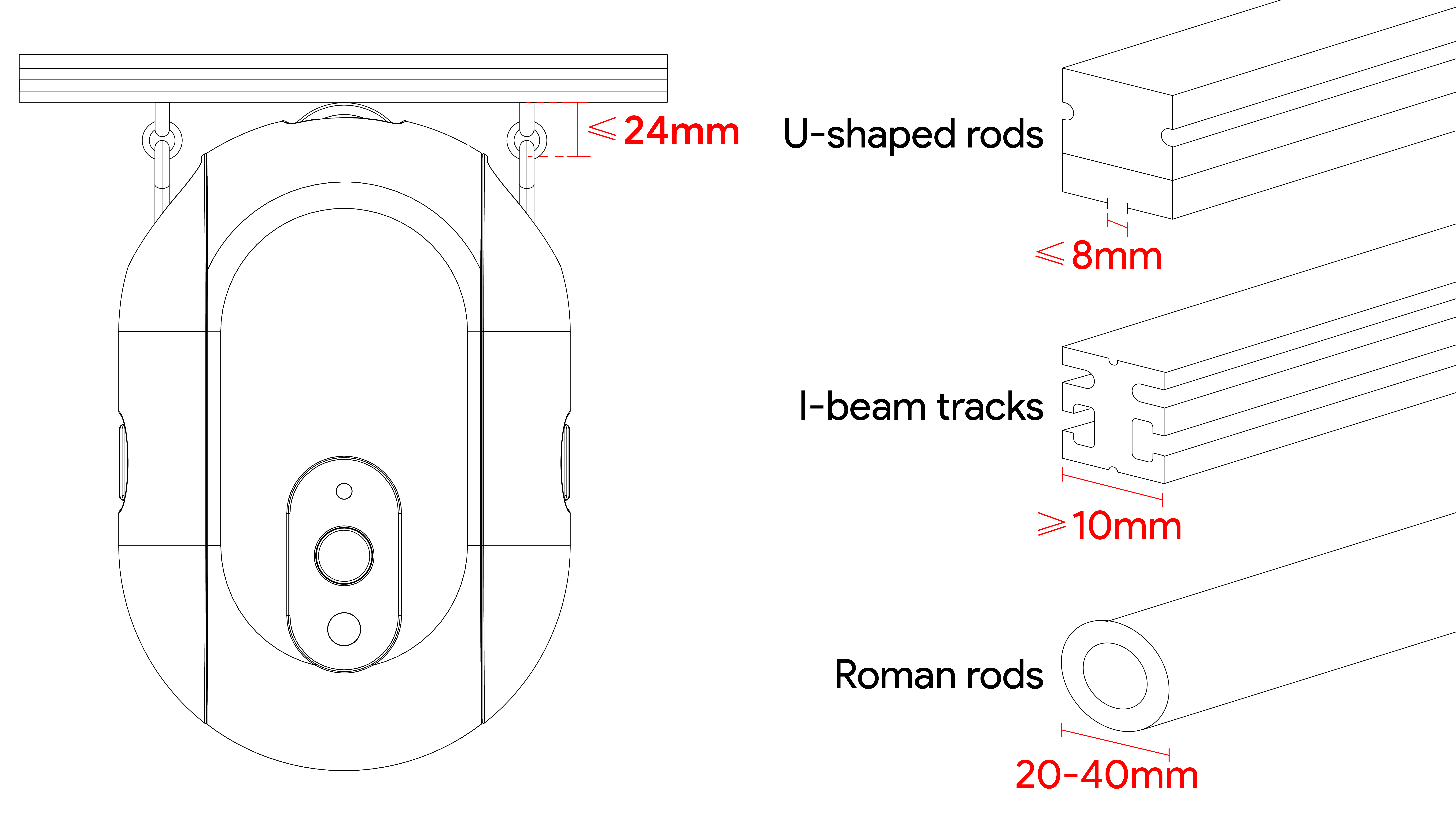
Note: For using with Roman rods, a separately sold accessory is required.
Before first use, complete motion calibration:
1. Pull the curtain to the fully closed position and install the curtain robot correctly.
2. Enter the device panel and tap “Motion Calibration”.
3. Select “Indoor” or “Outdoor” according to the direction of the curtain robot button. Select “Indoor” if the button faces the room, and select “Outdoor” if the button faces the window. Then tap Next.
4. Select “Left” or “Right” according to the direction in which the curtain needs to open. Select “Left” if the curtain opens to the left, and select “Right” if the curtain opens to the right. Then tap Next.
5. Select the curtain type. For a single curtain robot, select “Fully Open”. For two curtain robots, select “Half Open”. Then tap Next.
6. Tap the Start button. The curtain robot will drive the curtain in the curtain-opening direction and start calibration.
7. When the curtain is fully open, immediately tap the Stop button to complete calibration.
8. After calibration succeeds, tap OK to enter the control interface.

After entering the device panel:
• Tap the open curtain icon, and the curtain robot will move in the direction that opens the curtain.
• Tap the close curtain icon, and the curtain robot will move in the direction that closes the curtain.
• Tap the stop icon to stop the current movement.
• Use the slider to adjust the curtain to any target position.
To ensure best performance, do not manually pull the curtain or block the device movement while the curtain robot is pulling the curtain.

This product supports 1 countdown and 4 schedule groups. The countdown can be set for up to 24 hours. You can set the curtain to open or close at a specified time in the Smart Life App.
This product supports reporting light values and can automatically open or close the curtain by setting curtain light thresholds. The actual triggering effect may be affected by the installation position, light direction, and indoor obstructions.
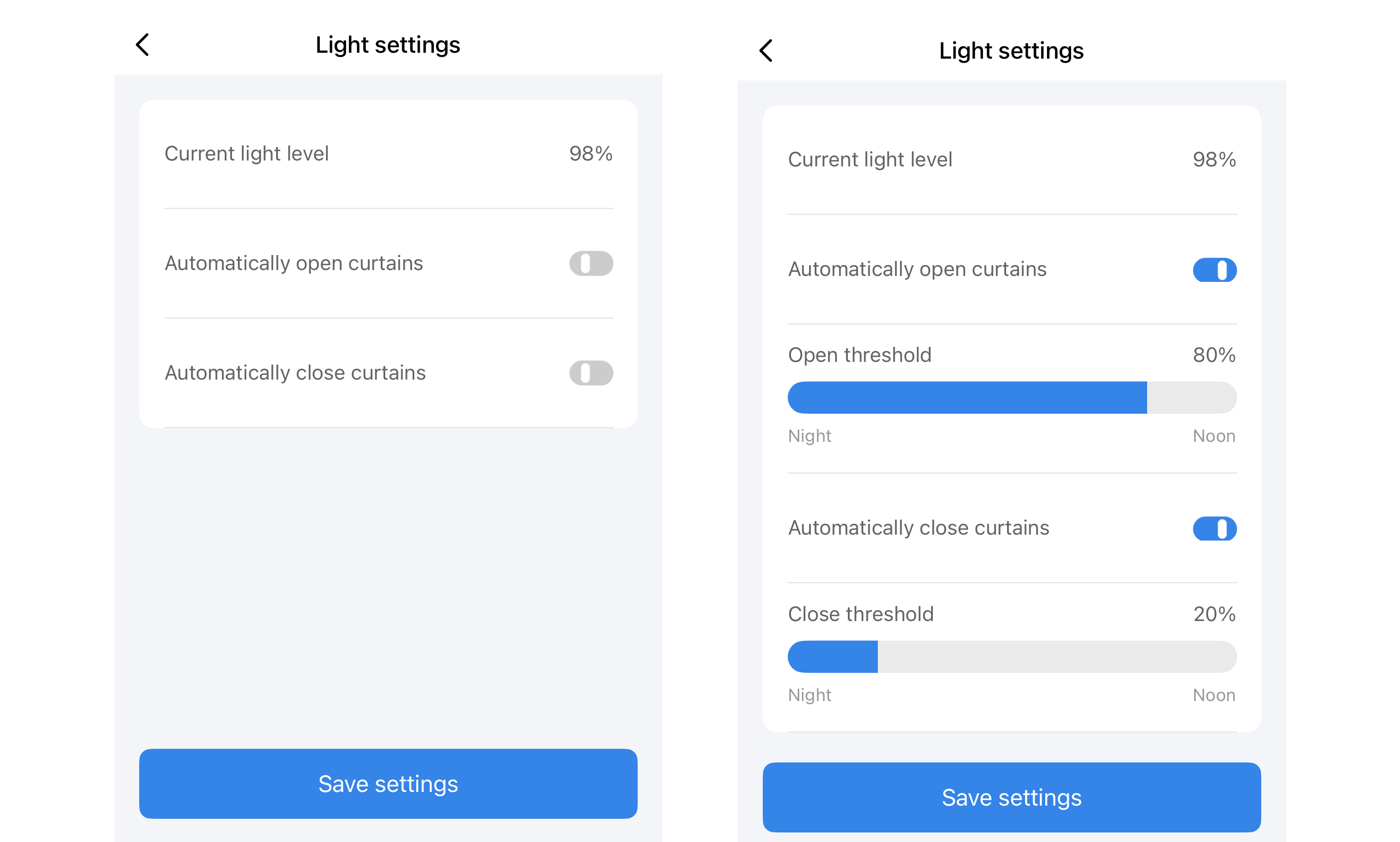
When the phone is within Bluetooth range of the device, the curtain robot can be controlled nearby through the Smart Life App.
For remote control from another location, automation, and voice control, use a Bluetooth gateway compatible with the Tuya protocol. After the Bluetooth gateway is connected to the home network, the curtain robot can remain online through the gateway. You can then:
• Remotely control the device through the Smart Life App when away from home;
• Create automations or tap-to-run actions in the App;
• Link third-party voice assistants according to the account region and platform support.
Product model: ADCBBI01
Product name: Smart Curtain Robot
Dimensions: 95 × 43 × 140 mm
Weight: 289 g
Communication protocol: BLE 5.0
Battery type: 3.7V lithium battery
Battery capacity: 2000 mAh
Charging port: Type-C
Power input: DC 5V/1A
Battery life reference: With a 4 m movement distance, one full charge can support up to 160 days of use
Operating temperature: 0°C–45°C / 32°F–113°F
Operating humidity: 0%RH–95%RH, non-condensing
Compatible tracks: U-shaped track, I-shaped track, Roman rod
Cloud platform: Tuya Smart IoT platform
Firmware version: 2.3
Hardware version: 1.0
General Warnings
• This product is not waterproof. Do not install it underwater, outdoors, or in humid environments.
• This product contains a lithium battery. Do not use or store it in humid or high-temperature environments.
• This product is only suitable for indoor curtain tracks.
• During use, make sure there are no human obstructions within the range of moving parts to avoid motor or internal mechanical structure damage caused by interference.
• Do not manually pull the curtain while the curtain robot is operating.
• Do not disassemble, modify, or repair this product by yourself.
• This product is not suitable for fire protection, medical, industrial control, or other critical control scenarios involving personal safety.
• This product is not a substitute for safety equipment.
Child Safety Warnings
• Keep the product and packaging materials out of the reach of children.
• Children must not use this product as a toy.
• Installation and charging should be completed by adults.
• During use, keep children away from the moving curtain and device to prevent pinching or pulling injuries.
Network and Privacy Notes
• Use a trusted home network to configure the Bluetooth gateway. Avoid using public open networks.
• After this product is bound, you can view device status, share the device, or revoke authorization in the Smart Life App.
• For multi-user sharing, use the family member or device sharing function in the App. Avoid directly sharing account passwords.
Make sure you have pressed and held the reset button for 5 seconds and that the device has entered the blue-light flashing state. If it still cannot be discovered, move the phone closer to the device and try again.
Perform motion calibration again and confirm that the top wheel fits against the track. During calibration, tap Stop promptly when the curtain is fully open.
Check whether there are foreign objects on the curtain track, whether the curtain is being manually pulled, or whether the track resistance is too high. The device supports abnormal running resistance detection and will stop to help reduce the risk of motor damage.
When used alone, the phone must be within Bluetooth range for nearby control. For remote control, use a Bluetooth gateway compatible with the Tuya protocol.
It can be used with Roman rods that meet the size requirements. If the distance between the ring hook position and the bottom end of the rod exceeds 24 mm. Roman rod accessories are required.