Remote AAA (2-Key, Zigbee) EN
User Manual

English



Linkoze Wireless Switch is a smart controller for other Linkoze smart home devices. It contains 2 keys and each of them is able to recognize three different gestures, click, double click, and long press. Powered by Linkoze cloud services, each key can become a part of home automation, triggering a series of smart scenes.
*An Linkoze Wireless Switch is required to connect the sensor to the Zigbee network.
You can search "Smart Life" in the mobile application store to install the App


Activate the Device
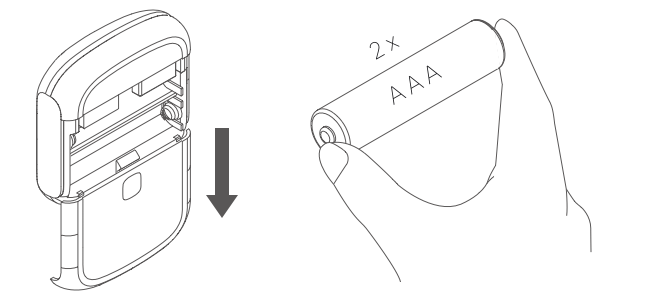
Slide down the rear cover to open the device case. Then put a battery into the product.
Press the reset button of the wireless switch for 10 seconds then release. The device is ready to be paired when the indicator light starts to flash together.

Open the app and choose your existing hub, enter the Search device page and add your device.

Key Automation Setup
Long press the device button on the main page to go to the control page where you can create cloud automations and bind them to the switch keys.

Dimensions: 51.2 x 51.2 x 12.6 mm
Weight: 20g
Key number: 2
Wireless protocol: Zigbee
Working voltage: DC 3V
Battery type: CR2032